Handling timestamps and time zones
- When writing data or events to IoT-Ticket, the timestamps must be in ISO 8601 format.
- DAS-SDK validates the timestamps that are in the data.
- Time zone must also be defined within the timestamp:
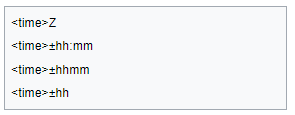 (1)
(1)
- Here, 'Z' is signaling UTC time and corresponds to '+00:00'.
- In the das-sdk, all methods that write data or events to IoT-Ticket, should accept a tz parameter that is of the form specified in the figure (1).
- This time zone parameter is validated as well.
- Default value for tz parameter is '+00:00'
Time zones in IoT-TICKET UI
- IoT-Ticket will identify the time zone that your browser is and show the data in local time in the UI.
- For example:
- A datapoint in your local environment has a timestamp '2025-08-25T17:00:00.000'.
- Your local environment is in time zone UTC+3 (Finland summer time).
- You post that data to IoT-Ticket with the tz parameter not defined.
- In IoT-Ticket's Data Management or Events tab you see the same data with a timestamp '25.8.2025 - 20:00:00'.
- This is because IoT-Ticket assumed the data was originally in UTC and converted it to match your local time.
- Example using the tz parameter:
- Same data, same environment
- Post using tz='+03:00'
- In IoT-Ticket the data is '25.8.2025 - 17:00:00'
- Conclusion: When writing data, IoT-Ticket assumes that the data is in UTC unless otherwise specified.
- The time zone parameter can also be used when getting data from IoT-Ticket: If not used, IoT-Ticket will give timestamps as UTC for your environment.